Practical guide for beginners and developers
A practical introduction to Dynamics 365 CRM and Dataverse: tables, forms, C# plugins, authorization, integrations and safe data migrations.
1. What is Dynamics 365 CRM?
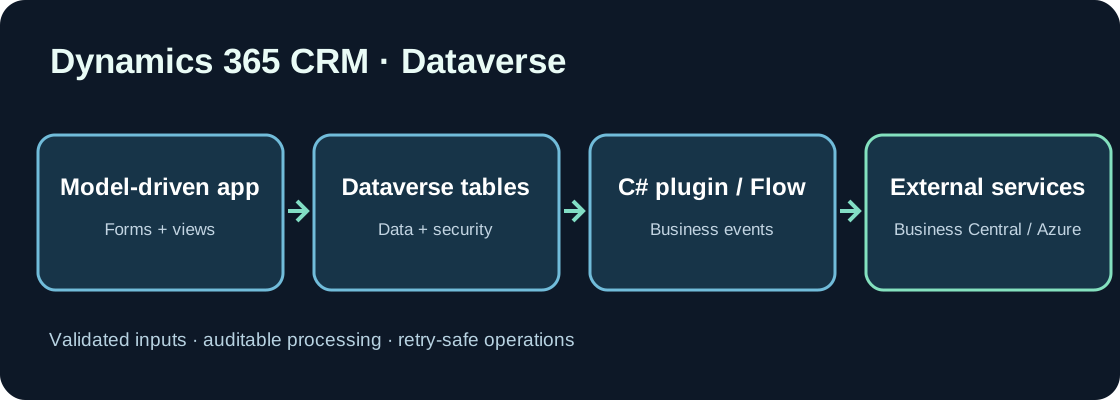
Dynamics 365 Sales, Customer Service and Field Service support customer-facing business processes. Microsoft Dataverse stores many of their business records. Dataverse provides relational data, APIs, security, events and application capabilities, not merely database tables. Model-driven apps display these records through forms and views.
2. Tables, columns and relationships
Standard tables such as account, contact and opportunity represent companies, people and sales opportunities. A record has an identifier, while relationships link entities. Check the standard model before creating custom tables and maintain extensions inside managed solutions when deploying between environments.
3. Start with no-code customization
Forms, views, business rules and Power Automate can address many requirements. Not every required field or UI behavior needs custom C#. Determine whether a rule concerns user experience or must be enforced on the server regardless of the calling client.
4. When should you write a C# plugin?
A Dataverse plugin reacts to platform messages such as Create and Update. Its pipeline stages include PreValidation, PreOperation and PostOperation. A PreOperation plugin may adjust supported values on the Target before they are saved. Long-running or unreliable cross-system processing is usually better handled asynchronously.
5. A small plugin example
This plugin normalizes an illustrative custom text field on Account creation. Replace new_externalreference with the actual logical column name in your solution. The example intentionally does not attempt to generate unique account numbers.
using System;
using Microsoft.Xrm.Sdk;

public class NormalizeAccountReference : IPlugin
{
    public void Execute(IServiceProvider services)
    {
        var context = (IPluginExecutionContext)
            services.GetService(typeof(IPluginExecutionContext));
        if (context?.MessageName != "Create" ||
            !context.InputParameters.Contains("Target") ||
            context.InputParameters["Target"] is not Entity target ||
            target.LogicalName != "account")
            return;

        var value = target.GetAttributeValue<string>("new_externalreference");
        if (!string.IsNullOrWhiteSpace(value))
            target["new_externalreference"] = value.Trim().ToUpperInvariant();
    }
}
Register the Create step on account in PreOperation. Reference the appropriate Microsoft.CrmSdk.CoreAssemblies package and test in an isolated environment.
6. Avoid timestamp-based identifiers
Two records may be created within the same second. A timestamp-derived account number is therefore not a reliable unique identifier. Prefer an appropriate numbering service, an atomic counter or an enforced alternate key. Account for concurrent plugin execution and runtime limits.
7. Integrating with the Dataverse Web API
External services use the Dataverse Web API with Microsoft Entra authentication and appropriate Dataverse permissions. Account for pagination, throttling and retry behavior. Azure Functions, Service Bus and Logic Apps can decouple downstream integrations with Business Central or SharePoint. Do not make synchronous plugins wait on slow remote business operations.
8. Migration order matters
Map accounts, contacts, opportunities and their relationships before importing. Clean source codes, deduplicate, import foundational entities before dependent records and use stable external identifiers. Test owners, teams and business units. Run representative rehearsals before delta migration and final cutover.
9. Security and audit
Dataverse security roles control privileges and access levels. Hiding a UI field is not an authorization mechanism. Give integration accounts the minimum rights they need. Review column security, audit requirements and handling of personal data.
10. Testing and operations
Test plugins with empty values, invalid payloads, repeated updates and concurrent writes. Large migrations may execute plugin code many times. Use targeted tracing without passwords or tokens. Reconcile records as well as their relationships and business meaning.
11. Conclusion
Reliable CRM development begins with a good understanding of Dataverse. Choose C# plugins when rules must be enforced by the platform across clients, rather than adding custom code for every change.
Discussion (0)
No comments yet. Be the first to contribute.