Beginner guide · REST API · HTTP · JSON
An API lets applications communicate. This beginner-friendly guide explains endpoints, HTTP methods, JSON, status codes and security with simple examples.
1. What is an API?
API stands for Application Programming Interface. It defines how one program can use the functions or data of another. Think of it as a contract: it specifies allowed requests, expected input and possible responses. Not every API uses HTTP, but web-based REST APIs are especially common for websites, mobile apps and business systems.
2. Client, server and endpoint
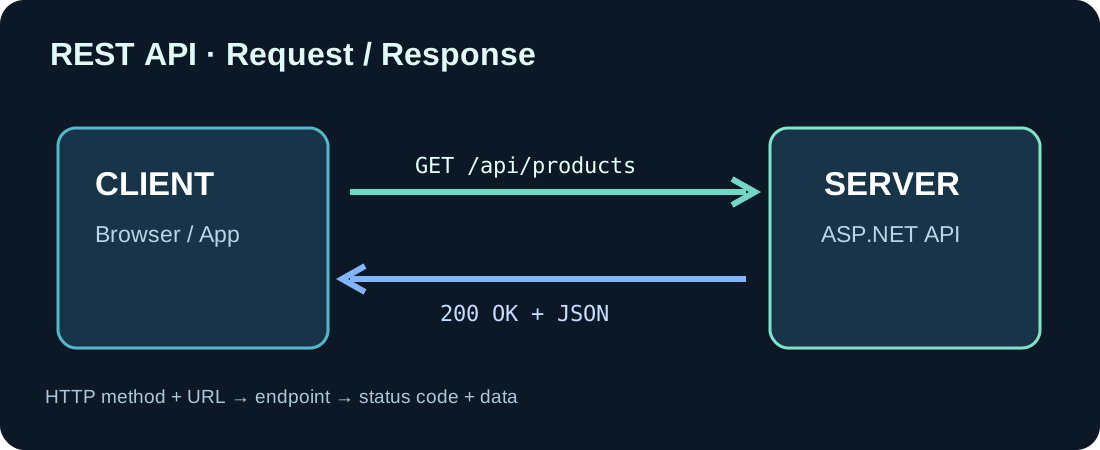
A client might be a browser, a mobile app or Microsoft Dynamics 365 Business Central. The server exposes the API. An endpoint is a specific URL such as https://api.example.com/api/products. The domain identifies the server while /api/products identifies the products resource. The illustration shows one request-response cycle.
3. What is HTTP?
HTTP is the protocol used to exchange messages. A request typically includes a method, URL, optional headers and sometimes a body. A response has an HTTP status, headers and often a JSON body. HTTPS protects data in transit but does not replace authentication and authorization.
4. GET, POST, PUT, PATCH and DELETE
GET retrieves information. POST often creates a resource or invokes an operation. PUT typically replaces a resource. PATCH changes selected properties. DELETE deletes a resource. The actual contract determines the semantics. GET endpoints should not cause business side effects.
5. Example HTTP request
This example retrieves a product. The Authorization header is illustrative; never publish real credentials or tokens.
GET /api/products/1 HTTP/1.1
Host: api.example.com
Accept: application/json
Authorization: Bearer YOUR_ACCESS_TOKEN
6. Understanding JSON responses
JSON represents objects with named properties and arrays of values. Here, id is a number while name is a string. JSON is a data format rather than a database or network protocol.
{
  "id": 1,
  "name": "Laptop",
  "price": 1200.00,
  "currency": "EUR"
}
7. Essential HTTP status codes
200 OK usually means a successful retrieval. 201 Created signals creation, and 204 No Content indicates a successful response without a body. 400 is a bad request, 401 an authentication failure, 403 insufficient permission, 404 missing resource and 500 a server failure. Avoid infinite retries when a service fails.
8. Security basics
Use HTTPS, enforce permissions on the server, validate input and consider rate limits. Never embed API secrets in source code or public URLs. Browser CORS rules are not an access-control system. Enterprise APIs may use Microsoft Entra ID access tokens.
9. Try a request yourself
Run the following command against your own test API once you have created it. The -i flag prints the status and headers. The next tutorial shows how to create that API in ASP.NET Core.
curl -i https://localhost:5001/api/products10. Where Business Central fits
Business Central can call APIs to exchange data with DMS platforms, shipping providers and webshops. First check whether a standard Business Central API already covers your use case. AL API pages or Azure Functions are options when custom behavior is needed.
11. Common beginner mistakes
A successful browser GET does not prove POST, validation or authorization works. An API endpoint is not necessarily a human-facing website. A successful HTTP status may represent acceptance rather than completed business processing. Document types, examples, status codes and versioning.
12. Next steps
Next, build an ASP.NET Core API with two endpoints and test it using curl. Later tutorials will add persistence, validation, OAuth authorization and Business Central integration.
Discussion (0)
No comments yet. Be the first to contribute.