Beginner tutorial · C# · ASP.NET Core · REST API
Build a small REST API that returns product data as JSON. You do not need Azure, a database or paid hosting. Everything initially runs on your own computer.
1. Install the prerequisites
Install a currently supported .NET SDK, such as .NET 10, and Visual Studio Code or Visual Studio. Run dotnet --info in a terminal to verify installation. This tutorial requires no SQL Server or Entra ID.
2. Create the application
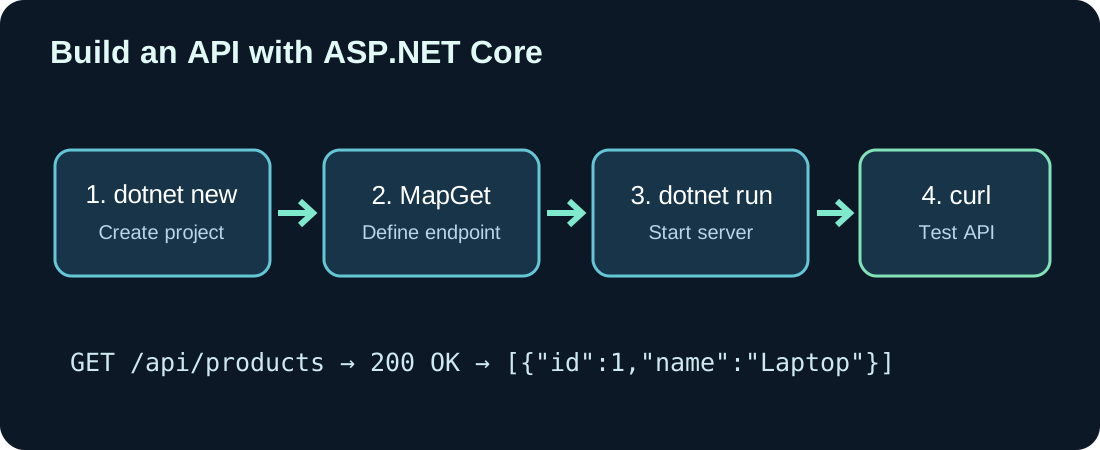
dotnet new web -n MyFirstApi
cd MyFirstApi
dotnet run
The web template creates a minimal ASP.NET Core application. The terminal prints the local address, perhaps http://localhost:5000. Your port may differ; always use the one actually shown.
3. Map your first endpoints
Replace Program.cs with:
var builder = WebApplication.CreateBuilder(args);
var app = builder.Build();

var products = new[]
{
    new Product(1, "Laptop", 1200m),
    new Product(2, "Mouse", 25m)
};

app.MapGet("/api/products", () => Results.Ok(products));

app.MapGet("/api/products/{id:int}", (int id) =>
{
    var product = products.FirstOrDefault(p => p.Id == id);
    return product is null
        ? Results.NotFound()
        : Results.Ok(product);
});

app.Run();

record Product(int Id, string Name, decimal Price);
CreateBuilder initializes the web host. MapGet maps an HTTP method and path to C# code. Results.Ok returns HTTP 200 and Results.NotFound returns 404. The Product record is our simple data model. Using decimal avoids some binary floating-point issues for this sample price.
4. Run and test the service
Start the app with dotnet run, then open the displayed URL with the endpoint path or use a terminal. Replace port 5000 as needed:
curl -i http://localhost:5000/api/products
curl -i http://localhost:5000/api/products/1
curl -i http://localhost:5000/api/products/999
The first request returns both products. The second returns one and the last responds with 404. On Windows PowerShell, use curl.exe if the curl command resolves to a PowerShell alias.
5. Understand the JSON response
[
  { "id": 1, "name": "Laptop", "price": 1200 },
  { "id": 2, "name": "Mouse", "price": 25 }
]
ASP.NET Core serializes C# values into JSON automatically. Default web serialization commonly uses camel-case properties, such as Id becoming id. Nothing is stored in a database: restarting this example recreates its sample array.
6. Accept a POST request
GET is for reading. POST allows a client to submit data. Add the following route before app.Run() to demonstrate binding, a basic check and a 201 response:
app.MapPost("/api/products", (Product product) =>
{
    if (product.Id <= 0 ||
        string.IsNullOrWhiteSpace(product.Name) ||
        product.Price < 0)
        return Results.BadRequest("Invalid product.");

    return Results.Created(
        $"/api/products/{product.Id}", product);
});
This example deliberately does not persist the product. It demonstrates an HTTP contract, not a finished CRUD application. Real applications need storage, robust validation and safe generation of unique identifiers.
curl -i -X POST http://localhost:5000/api/products \
  -H "Content-Type: application/json" \
  -d '{"id":3,"name":"Keyboard","price":49.90}'
7. Troubleshooting common errors
- Connection refused: The app is not running or the port is wrong.
- 404: The URL or HTTP method does not match a mapped route.
- 400: The request body is invalid or fails validation.
- Local HTTPS warning: You may need
dotnet dev-certs https --trustfor a development certificate. - Browser CORS errors: A separate frontend may need CORS configuration. CORS does not replace authentication or authorization.
8. What is missing for production?
This example has no access control and no persistence. Production systems need authentication, authorization, input validation, fault handling, observability, tests, API versioning and usually a database. Never expose confidential business data through an unprotected public endpoint.
9. Connecting Business Central later
Business Central AL can invoke HTTP endpoints and process JSON using HttpClient. A .NET API or Azure Function may handle more complex workflows. Verify a simple GET endpoint first, then introduce identity, error handling and deployment.
10. Exercises
- Add a third product and request it by ID.
- Confirm that a missing ID returns HTTP 404.
- Add a
/healthendpoint that returns a simple status object. - Submit an invalid POST body and explain the response code.
Discussion (0)
No comments yet. Be the first to contribute.