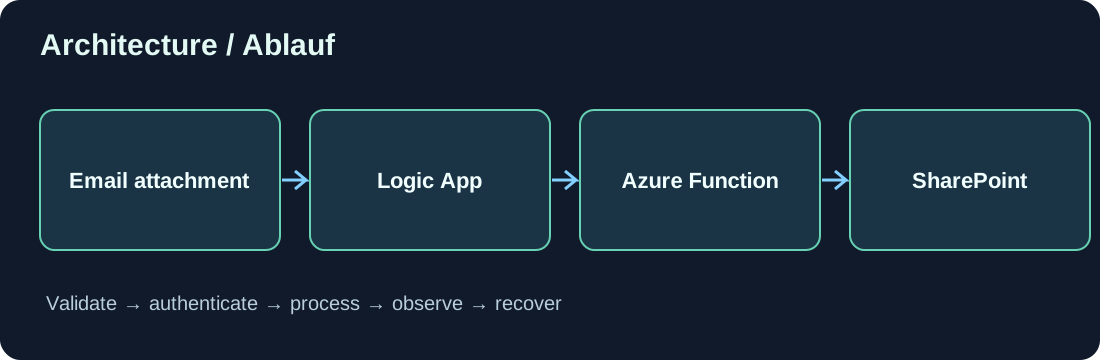
Ich wollte eine robuste Pipeline bauen, die PDFs aus eingehenden E-Mails nimmt, mit Metadaten anreichert und über Microsoft Graph in SharePoint ablegt – sauber nach Gesellschaft/Legal Entity einsortiert. Wichtig war mir dabei: keine Secrets im Flow, sondern Azure Key Vault und wo möglich Managed Identities.
Hier zeige ich dir mein Setup: zwei Logic Apps (Ingest & Upload) plus eine kleine Azure Function für den Graph-Upload.
Architektur auf einen Blick
Logic App #1 – Mail-Ingest (Consumption)
Outlook-Trigger → pro PDF-Anhang: Metadaten bestimmen → HTTP-Call an Upload-API
Logic App #2 – Upload-API (Consumption)
HTTP-Trigger (JSON) → Parse → Key Vault: Secrets holen → Switch (LegalEntity → Site-URL) → Azure Function „UploadDocumentToDMS“ aufrufen → 200/400 Response
Azure Function (.NET 8 isolated)
Key Vault (Managed Identity) → Graph-Client → Ordner sicherstellen → Chunk-Upload → WebLink zurückgeben
1) Logic App #1 – E-Mail rein, PDF raus
- Trigger:Office 365 Outlook – When a new email arrives (V3)
includeAttachments = true,folderPath = Inbox
- For each
@triggerBody()?['attachments']- Condition: nur PDFs (
endsWith(item()?['name'], '.pdf')) - Compose Metadaten (z. B. aus Betreff/Body):
DocumentType: per Regex aus Betreff, fallback „General“LegalEntity: z. B. Kürzel in der Empfängeradresse/BetreffDocumentDate:utcNow()oder Datum im Body
- HTTP (POST) an Logic App #2
- Body (vereinfacht): jsonCopyEdit
{ "LegalEntity": "@{variables('LegalEntity')}", "DocumentType": "@{variables('DocumentType')}", "Filename": "@{item()?['name']}", "FileStream": "@{base64(body('Get_attachment_content'))}", "SalesId": "@{…}", "VendorId": "@{…}", "CustomerId": "@{…}", "PONumber": "@{…}", "DocumentDate": "@{…}" } - Tipp: Idempotenz über Message-Id + Attachment-Id (Hash) prüfen, damit keine Doppeluploads entstehen.
- Body (vereinfacht): jsonCopyEdit
- Condition: nur PDFs (
2) Logic App #2 – Upload-API mit Key Vault
Trigger: When a HTTP request is received mit JSON-Schema (LegalEntity, DocumentType, Filename, FileStream, …).
Parse JSON → Switch (LegalEntity) setzt nur die Site-URL (z. B. https://contoso.sharepoint.com/sites/FIN_D365_XX_DMS).
Keine Secrets in Variablen!
Key Vault-Abruf (ohne Secrets im Flow)
- System-Assigned Managed Identity für die Logic App aktivieren.
- In Key Vault: Secrets ablegen, z. B.
GRAPH-APP-CLIENT-IDGRAPH-APP-CLIENT-SECRET(oder besser: Zertifikat & Thumbprint)
- Access Policy / RBAC: der Logic App Get Secret erlauben.
- Aktion:Azure Key Vault → Get Secret (zweimal: ClientId, ClientSecret).
- Outputs heißen z. B.
@body('Get_Graph_ClientId')?['value'].
- Outputs heißen z. B.
Aufruf der Azure Function
- Azure Function „UploadDocumentToDMS“ (HTTP-Trigger) mit Payload: jsonCopyEdit
{ "BusinessUnit": "@{body('Parse_JSON')?['BusinessUnit']}", "DocumentType": "@{body('Parse_JSON')?['DocumentType']}", "FileName": "@{body('Parse_JSON')?['Filename']}", "BaseSharepointUrl": "@{variables('SPLink')}", "TenantId": "@{parameters('TenantId')}", "SharepointGraphClientId": "@{body('Get_Graph_ClientId')?['value']}", "SharepointGraphClientSecret": "@{body('Get_Graph_ClientSecret')?['value']}", "SalesId": "@{body('Parse_JSON')?['SalesId']}", "VendorId": "@{body('Parse_JSON')?['CustomerId']}", "PONumber": "@{body('Parse_JSON')?['DocumentDate']}", "FileStream": "@{body('Parse_JSON')?['FileStream']}" } - Response: 200 (Function-Body) oder 400 (Fehler).
Bonus: Du kannst ClientId/Secret auch der Function überlassen (siehe unten) und aus der Upload-API nur „saubere“ Metadaten + FileStream schicken.
3) Azure Function – Graph-Upload mit Key Vault & Managed Identity
Die Function hat System-Assigned Identity und zieht sich das Graph-Secret selbst aus Key Vault. So muss Logic App #2 keine Secrets kennen.
Pakete: Azure.Identity, Azure.Security.KeyVault.Secrets, Microsoft.Graph
csharpCopyEditusing Azure.Identity;
using Azure.Security.KeyVault.Secrets;
using Microsoft.Azure.Functions.Worker;
using Microsoft.Azure.Functions.Worker.Http;
using Microsoft.Graph;
using System.Net;
using System.Text.Json;
public class UploadDocumentToDMS
{
private readonly SecretClient _secrets;
private static readonly JsonSerializerOptions JsonOpts = new() { PropertyNamingPolicy = JsonNamingPolicy.CamelCase };
public UploadDocumentToDMS(IConfiguration cfg)
{
// Key Vault URL aus App Setting: KEYVAULT_URL = https://<vault>.vault.azure.net/
var kvUrl = cfg["KEYVAULT_URL"]!;
_secrets = new SecretClient(new Uri(kvUrl), new DefaultAzureCredential());
}
public record Payload(
string TenantId,
string BaseSharepointUrl,
string LegalEntity,
string DocumentType,
string FileName,
string FileStream,
string? SalesId, string? VendorId, string? CustomerId, string? PONumber, string? DocumentDate
);
[Function("UploadDocumentToDMS")]
public async Task<HttpResponseData> Run([HttpTrigger(AuthorizationLevel.Function, "post")] HttpRequestData req)
{
try
{
var p = await JsonSerializer.DeserializeAsync<Payload>(req.Body, JsonOpts) ?? throw new Exception("Invalid body.");
// 1) Secrets laden (App-Only)
var appId = (await _secrets.GetSecretAsync("GRAPH-APP-CLIENT-ID")).Value.Value;
var appSecret = (await _secrets.GetSecretAsync("GRAPH-APP-CLIENT-SECRET")).Value.Value;
// 2) Graph-Client
var cred = new ClientSecretCredential(p.TenantId, appId, appSecret);
var graph = new GraphServiceClient(cred, new[] { "https://graph.microsoft.com/.default" });
// 3) Site & Drive
var (host, path) = ParseSite(p.BaseSharepointUrl); // host=contoso.sharepoint.com, path=sites/FIN_D365_XX_DMS
var site = await graph.Sites.GetByPath(path, host).GetAsync() ?? throw new Exception("Site not found.");
var drive = await graph.Sites[site.Id].Drive.GetAsync() ?? throw new Exception("Drive not found.");
// 4) Zielpfad
var year = TryYear(p.DocumentDate) ?? DateTime.UtcNow.Year.ToString();
var key = First(p.SalesId, p.VendorId, p.CustomerId, p.PONumber) ?? "General";
var folderPath = $"DMS/{San(p.DocumentType)}/{year}/{San(key)}";
await EnsureFoldersAsync(graph, drive.Id!, folderPath);
// 5) Upload (<=4MB direkt, sonst Chunk)
var bytes = Convert.FromBase64String(p.FileStream);
var itemPath = $"{folderPath}/{EnsurePdf(p.FileName)}";
Microsoft.Graph.Models.DriveItem uploaded;
if (bytes.Length <= 4 * 1024 * 1024)
{
using var ms = new MemoryStream(bytes);
uploaded = await graph.Drives[drive.Id].Root.ItemWithPath(itemPath).Content.PutAsync(ms);
}
else
{
var session = await graph.Drives[drive.Id].Root.ItemWithPath(itemPath).CreateUploadSession.PostAsync(new());
using var ms = new MemoryStream(bytes);
var provider = new Microsoft.Graph.Models.Upload.UploadSessionProvider(session, graph, ms, 320 * 1024);
var result = await provider.UploadAsync();
uploaded = result.UploadedItem!;
}
var ok = req.CreateResponse(HttpStatusCode.OK);
await ok.WriteAsJsonAsync(new { siteId = site.Id, path = itemPath, webUrl = uploaded.WebUrl }, JsonOpts);
return ok;
}
catch (Exception ex)
{
var bad = req.CreateResponse(HttpStatusCode.BadRequest);
await bad.WriteAsJsonAsync(new { error = ex.Message }, JsonOpts);
return bad;
}
}
static (string host, string path) ParseSite(string url)
{
var u = new Uri(url);
return (u.Host, u.AbsolutePath.Trim('/')); // e.g. sites/FIN_D365_XX_DMS
}
static string? TryYear(string? s) => DateTime.TryParse(s, out var d) ? d.Year.ToString() : null;
static string? First(params string?[] xs) => xs.FirstOrDefault(x => !string.IsNullOrWhiteSpace(x));
static string San(string? s) => string.IsNullOrWhiteSpace(s) ? "General" : s.Trim().Replace('/', '-');
static string EnsurePdf(string name) => name.EndsWith(".pdf", StringComparison.OrdinalIgnoreCase) ? name.Trim() : $"{name.Trim()}.pdf";
}
Warum so?
- Secrets bleiben im Key Vault; Logic App & Function nutzen Managed Identity.
- Sites.Selected für Graph (App-Only) gibt minimalen Zugriff: nur die freigegebenen Sites.
- Chunk-Upload ist stabil bei großen PDFs.
Sicherheit & Betrieb
- Entra ID App (Graph): bevorzugt Zertifikat statt Client Secret; Scope Sites.Selected.
- Key Vault: alle Secrets dort, Zugriff via Managed Identity (Get/List eingeschränkt).
- Idempotenz: E-Mail-MessageId + AttachmentId hashen und in DMS/Log markieren.
- Validation: Nur
contentType = application/pdfakzeptieren; Dateinamen säubern. - Observability: Function/Logic-Apps in Application Insights, Fehlerpfad (400-Antwort) in eine Fehlerliste schreiben.
Beispiel-Payload (Mail-Ingest → Upload-API)
jsonCopyEdit{
"LegalEntity": "FIN",
"DocumentType": "Invoice",
"Filename": "INV-2025-00231.pdf",
"FileStream": "<BASE64>",
"SalesId": null,
"VendorId": "30010",
"CustomerId": null,
"PONumber": "45001234",
"DocumentDate": "2025-08-09"
}
Fazit
Mit zwei kleinen Logic-Apps und einer kompakten Function bekommst du E-Mail-PDFs zuverlässig nach SharePoint – sauber einsortiert, sicher authentifiziert und ohne Hard-coded Secrets. Key Vault ist dabei der Dreh- und Angelpunkt: Secrets raus aus den Flows, rein in ein zentrales, auditierbares Tresor-System. Wenn du willst, passe ich dir die Ingest-Regeln (Betreff-Parsing, Mandanten-Mapping, Metadaten) und das Berechtigungsmodell (Sites.Selected, Zertifikate) genau auf eure Umgebung an.
Schreibe einen Kommentar